Collaborative and efficient scientific software support architecture

Kick-off workshop

December 5, 2025

Introduction

CAES³AR project team

Institutes

  • Geophysical Imaging and Monitoring (GIM)
  • Research Process and Data Management, IT Center (ITC)

Principal investigators

  • Prof. Dr. sc. Florian Wagner (GIM)
  • Dr. rer. nat. Marius Politze (ITC)

Project team

  • Andrea Balza Morales, M.Sc. (GIM)
  • Camilla Lüttgens, M.Sc. (ITC)
  • Dr. rer. nat. Marc Boxberg (GIM)
  • Marcel Nellesen (ITC)

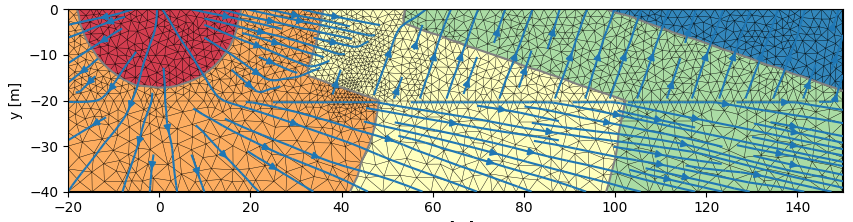
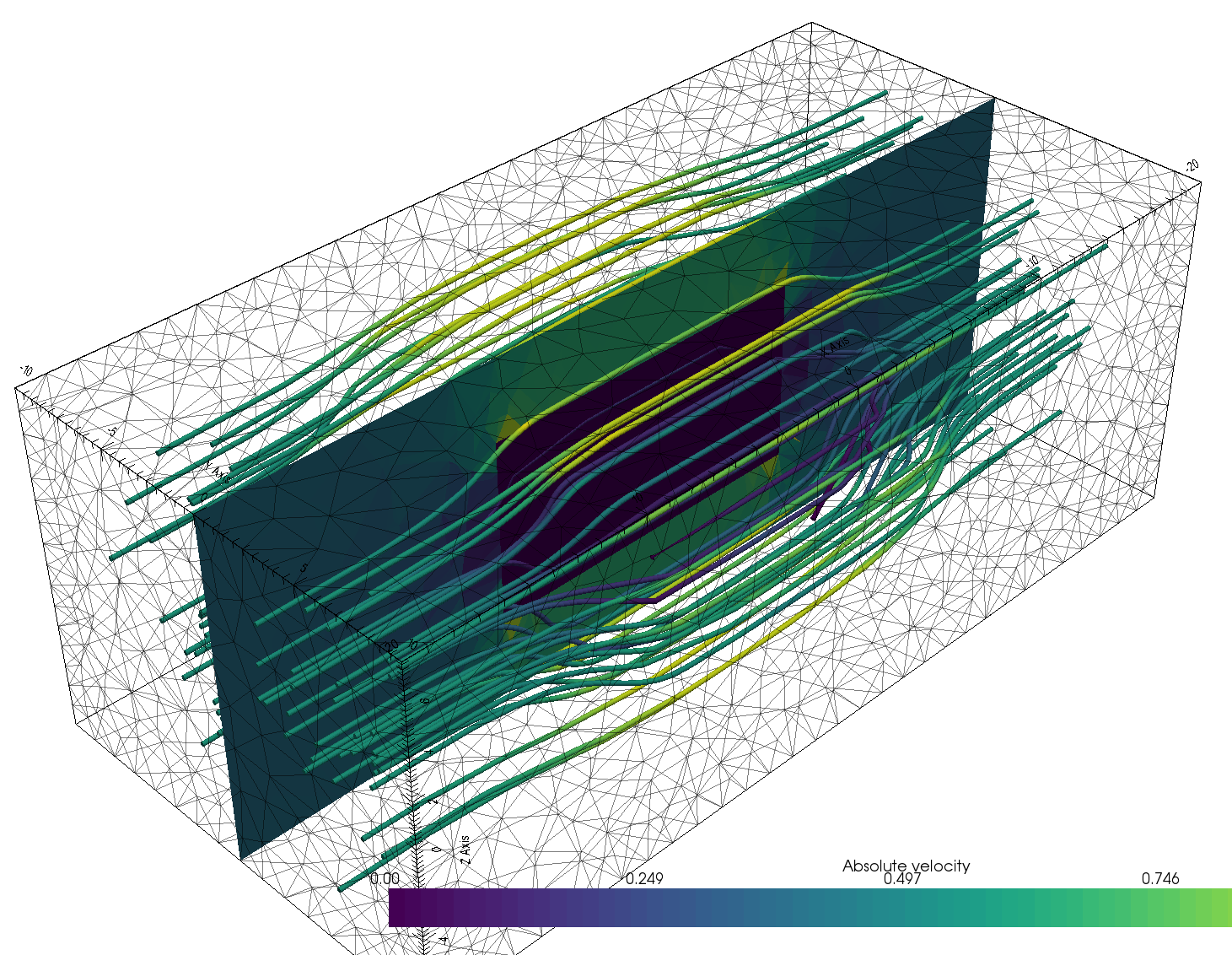
pyGIMLi is a versatile open-source toolbox:

  • Open-source library for modeling and inversion in geophysics
  • Management tools for structured and unstructured meshes in 2D & 3D
  • Computationally efficient finite-element and finite-volume solvers
  • Various geophysical forward operators: ERT/IP, Seismics/GPR traveltime, Gravity, Magnetics, SP, EM
  • Versatile inversion frameworks
  • Open-source, platform compatible, documented & tested code
  • Suited for teaching & reproducible research
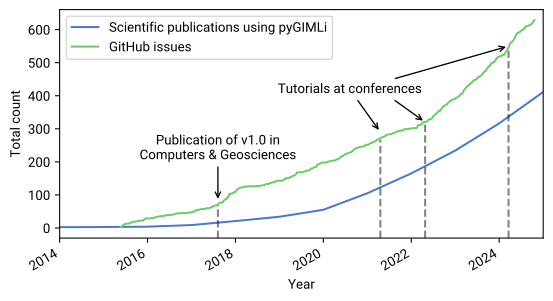
  • v1.0 published in Computers and Geosciences (Rücker et al. 2017) (among 5 Most Downloaded papers and more than 550 citations) and broadly used since
Growing user base, growing support requests
Motivation of the project

Collaborative and efficient scientific software support architecture

Scientific open-source software is often

  • developed by scientists, not software developers
  • maintained by a small team of core developers
  • built with limited resources
  • a user-sided library, not a cloud service
  • depending on third-party packages

Software support is additionally challenged due to

  • differences in system hardware, dependencies, and input data
  • limited knowledge of minimal working examples
  • lacking possibility of interactive and collaborative programming in issues and mails

Agenda

Time Session topic
9:00 Introduction
9:15 Survey analysis
9:35 Breakout sessions – Ice breaker
9:50 Lightning talks – Part I
10:30 Break
10:45 Lightning talks – Part II
11:25 Demo and pyGIMLi prototype
11:45 Breakout sessions – Developer/User perspectives
12:05 Break
12:20 Breakout sessions – Developer/User perspectives
12:40 Summary of breakout sessions
13:00 Feedback round
13:15 Closing remarks

Analysis

Objectives

  • Gain an overview of participants’ technical backgrounds.
  • Identify the key challenges they currently encounter.
  • Understand which topics or issues attract the most interest.
  • Capture perspectives from both developer and user viewpoints.

General statistics

What is the career stage distribution of participants?

  • A total of 41 participants submitted responses
  • Outreach was conducted through:
    • mailing lists
    • personal networks
    • JOSS publications
    • online message boards
    • GitHub
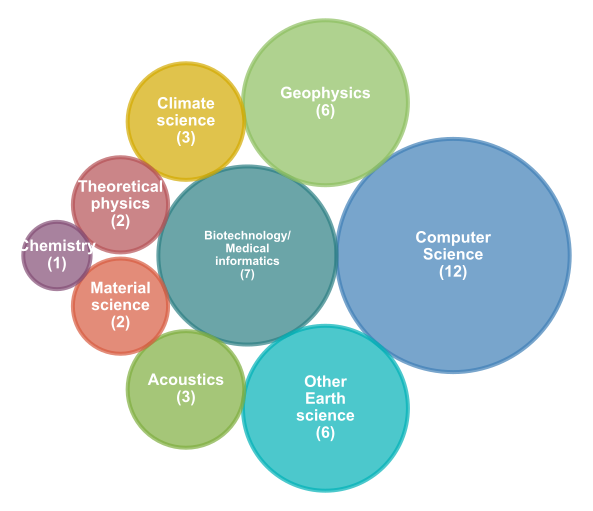
Figure 1

Variety of different disciplines

Figure 2

What roles do participants have and what programs do they use?
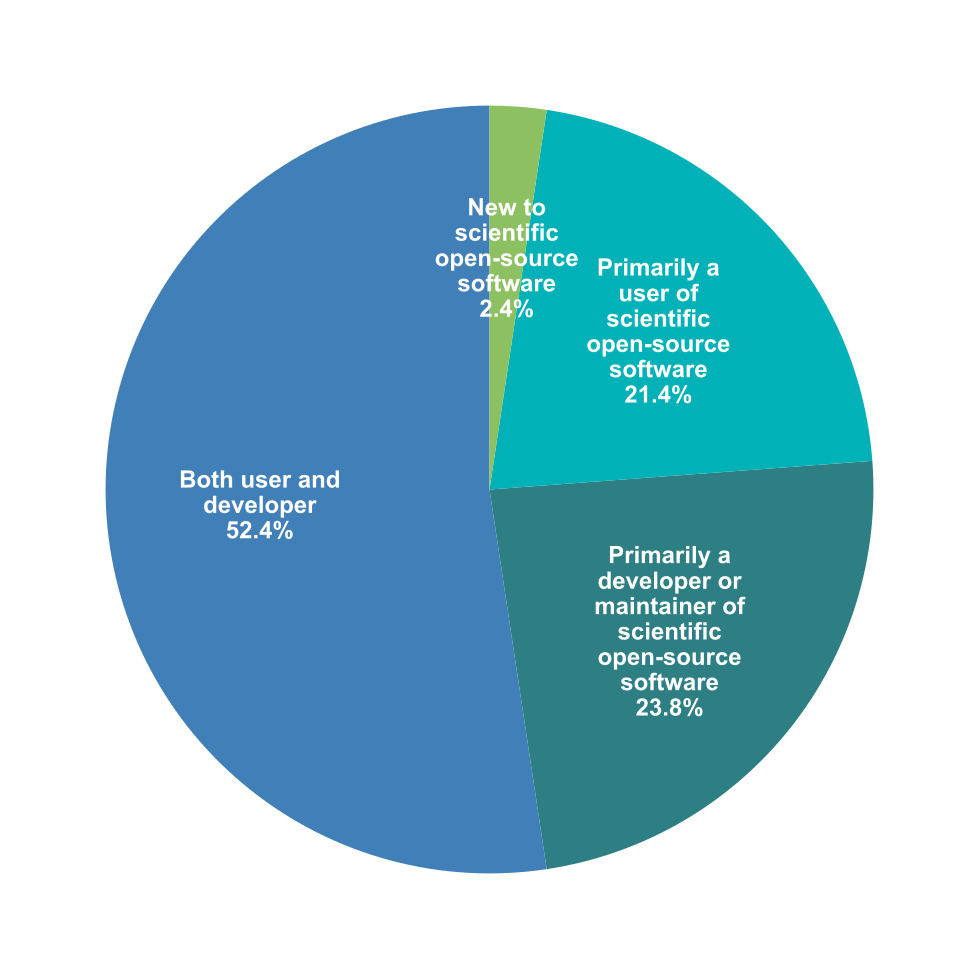
Figure 3


---------------------------------------------------------------------------
NameError                                 Traceback (most recent call last)
Cell In[11], line 25
     13 rwth_cmap = LinearSegmentedColormap.from_list("rwth_colors", rwth_palette)
     15 # Generate word cloud with RWTH colors
     16 wordcloud = WordCloud(
     17     width=1600, 
     18     height=1600,
     19     background_color='white',
     20     colormap=rwth_cmap,
     21     max_words=100,
     22     relative_scaling=0.2,
     23     min_font_size=10,
     24     stopwords=custom_stopwords
---> 25 ).generate(all_text)
     27 # Display word cloud
     28 ax.imshow(wordcloud, interpolation='bilinear')

NameError: name 'all_text' is not defined
Figure 4

Which programming languages are most commonly used?
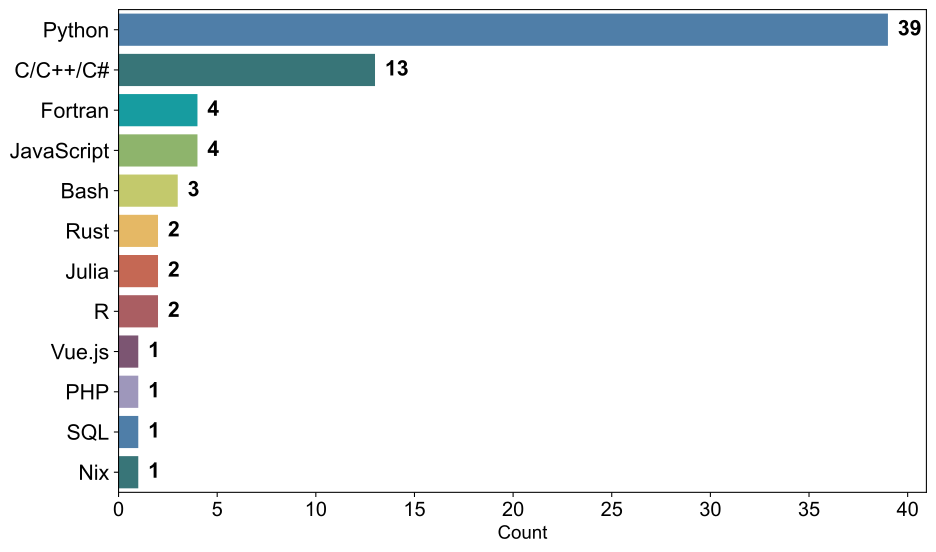
Figure 5

Which research tools or topics are you most interested in?
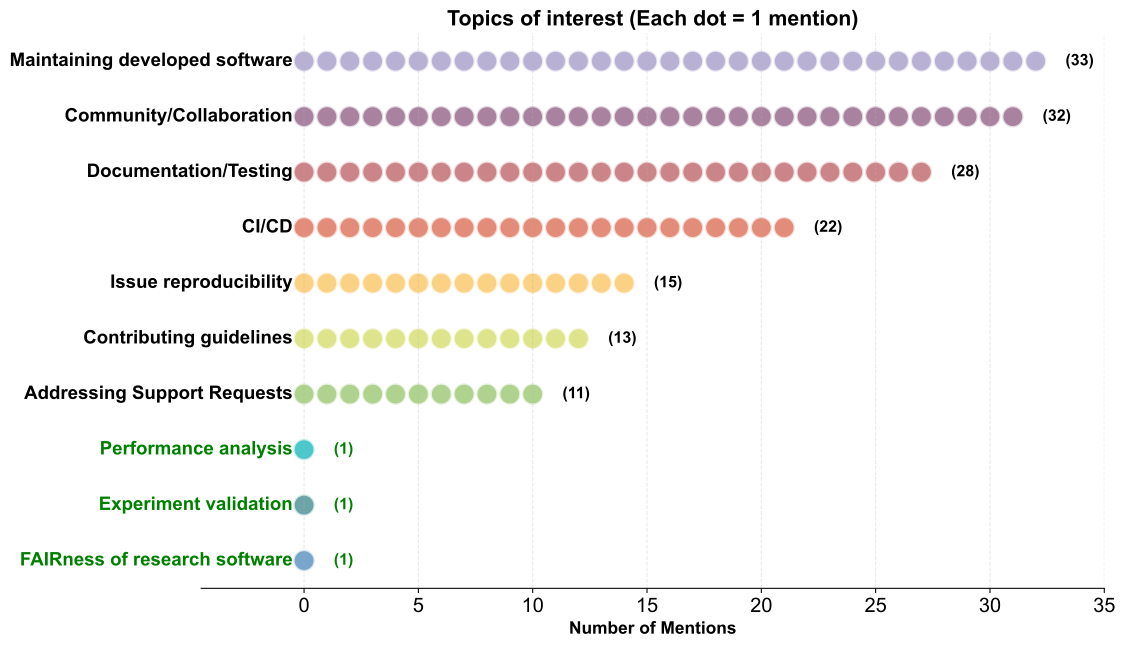
Figure 6

Research tools and topics by user type

How do interests differ between users and developers?

  • Different perspectives between user and developer roles
  • Some overlap in key areas of interest
Figure 7

As a developer and user, which tools do you consider most valuable in developing open-source software?

Version Control & Repository Standards

  • Git, GitHub, GitLab
  • Structured repos, clear contribution guidelines
  • Onboarding materials for new developers

Automation & CI/CD

  • CI/CD pipelines (testing, building, deployment)
  • GitHub Actions / GitLab CI / GitHub copilot
  • Build tools: make, CMake
  • Containers (Docker)
  • Packaging / distribution tools

Development Environments

  • IDEs: PyCharm, VSCode
  • Editors: Neovim
  • Debuggers: gdb
  • Linters: Ruff

Documentation Infrastructure

  • Scientific Python guides
  • Contributor & user documentation
  • GitHub Pages for hosting

Collaboration & Communication

  • Zoom, Mattermost, GitHub discussions
  • Ticketing systems (e.g., Zammad)
  • Jupyter notebooks for interactive workflows

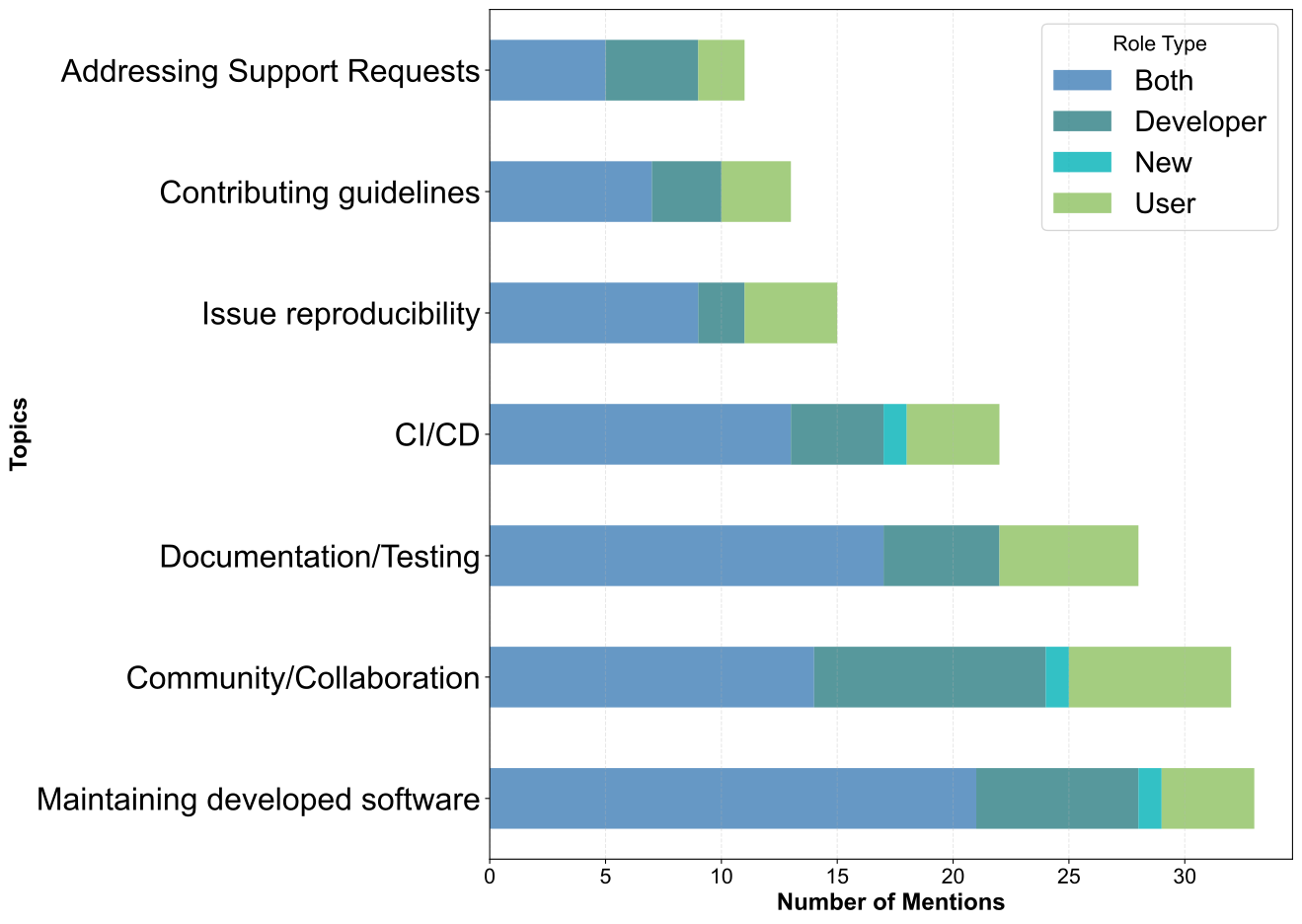
As a developer, what is the biggest challenge you encounter in maintaining open-source software?
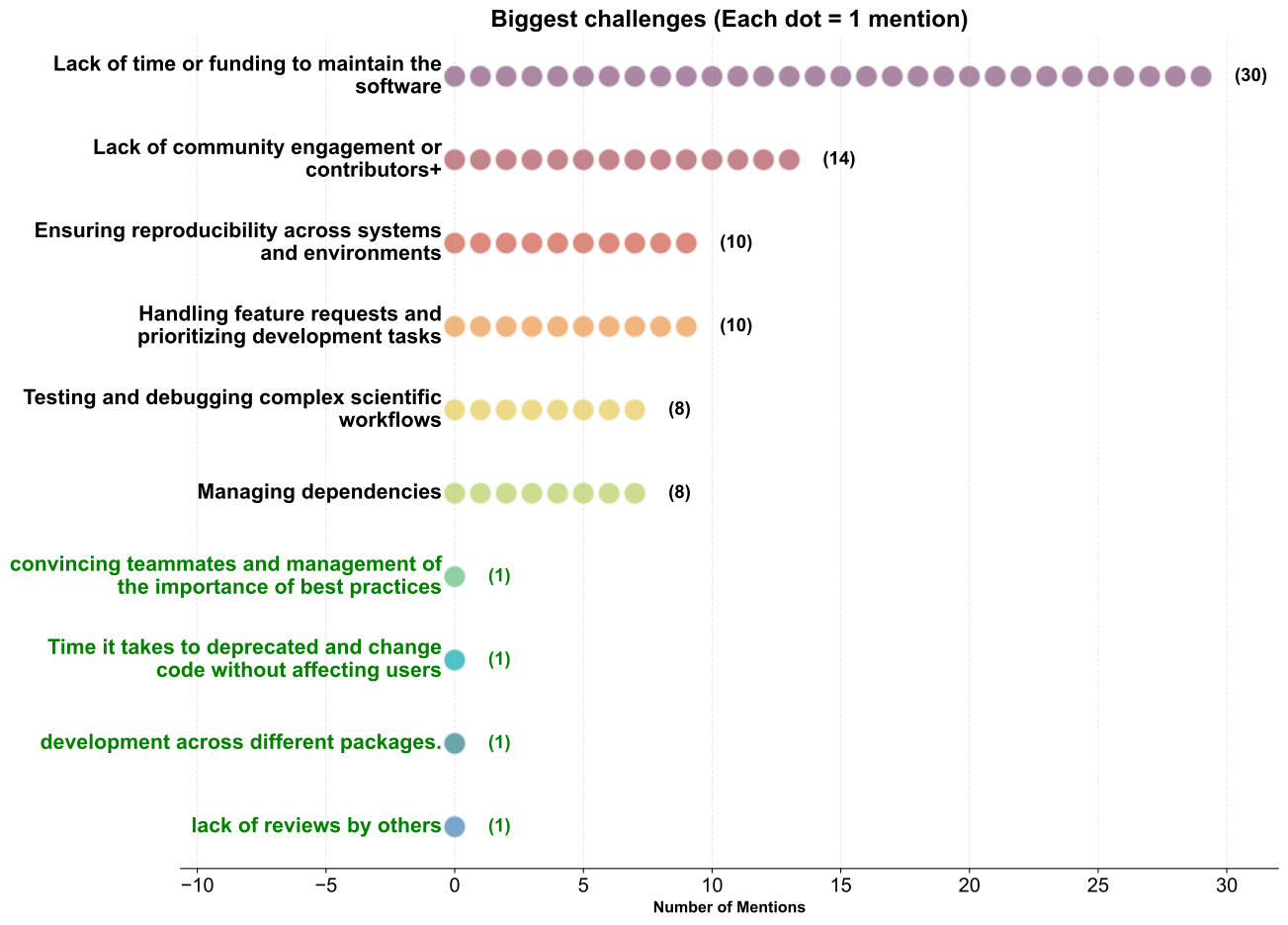
Figure 8

As a developer, how do you currently deal with support requests / issues ?

  • Community platform refers to message boards
  • A notable number of contribution related to ticket systems
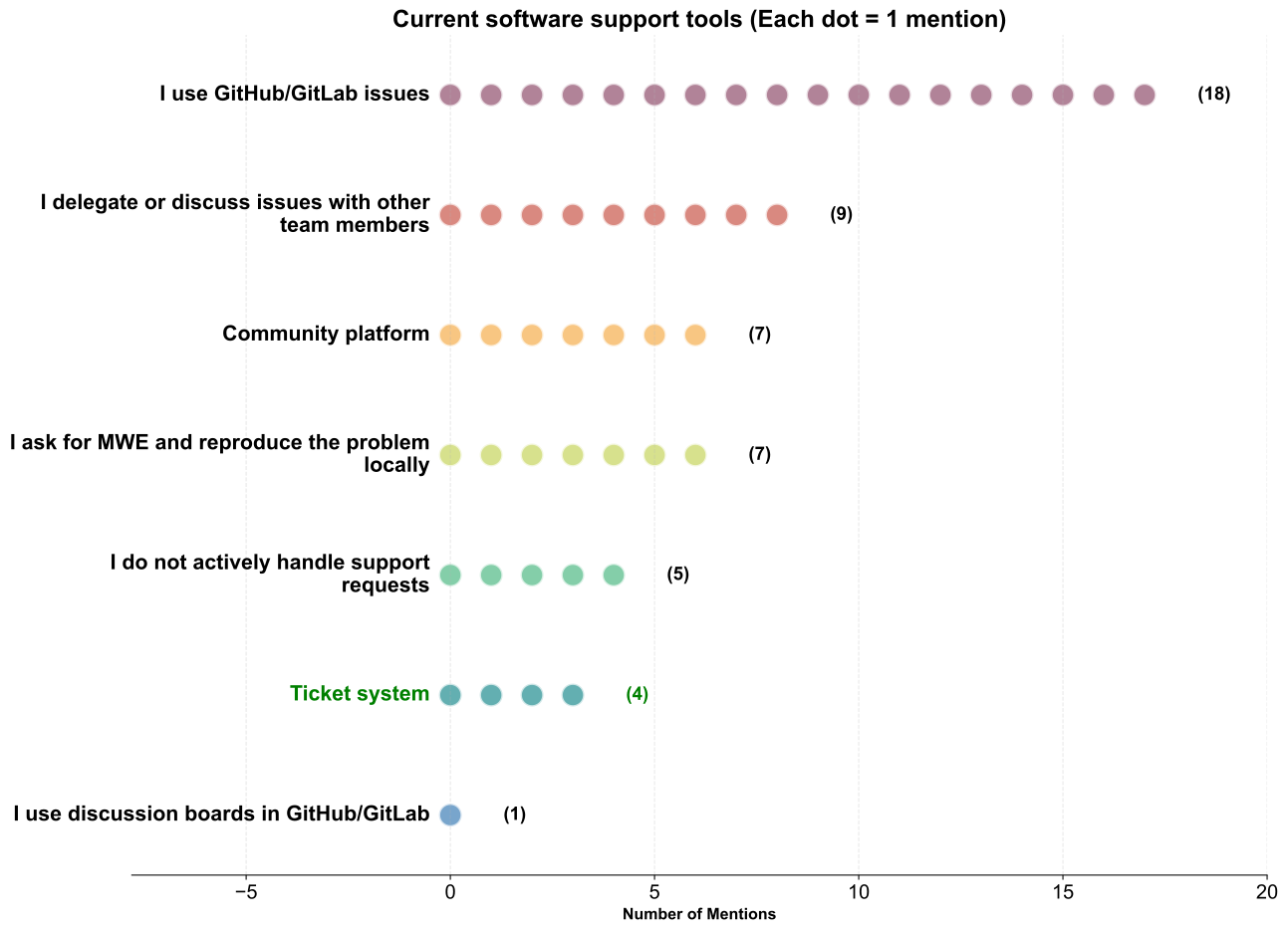
Figure 9

Ice Breaker

Ice Breaker

Groups of about five people (randomly distributed)


What you could talk about

  • What is your experience with scientific software?
  • What do you expect from this workshop?
  • What was your most significant support request experience?

Time

5 minutes



Lightning Talks Part 1

pyfar.org

Anne Heimes (IHTA - RWTH Aachen University)

Marco Berzbon (Technical University of Eindhoven)

PSimPy

Sathyamurthy Hegde (MBD –RWTH Aachen University)

GemPy

Miguel de La Varga (Terranigma Solutions GmbH)

polartoolkit, Invert4Geom

Matt Tankersley (University of Kiel)

15 Minute Break

15 Minute Break

Lightning Talks Part 2

pyGIMLi

Thomas Günther (TU Freiberg)

Repository analysis

Camilla Lüttgens (ITC - RWTH Aachen University)

matscipy

Petr Grigorev (INSA Lyon, Universite Claude Bernard)

emsig (& more )

Dieter Werthmüller (GEG - ETH Zürich)

CAESAR Architecture

Architecture Overview

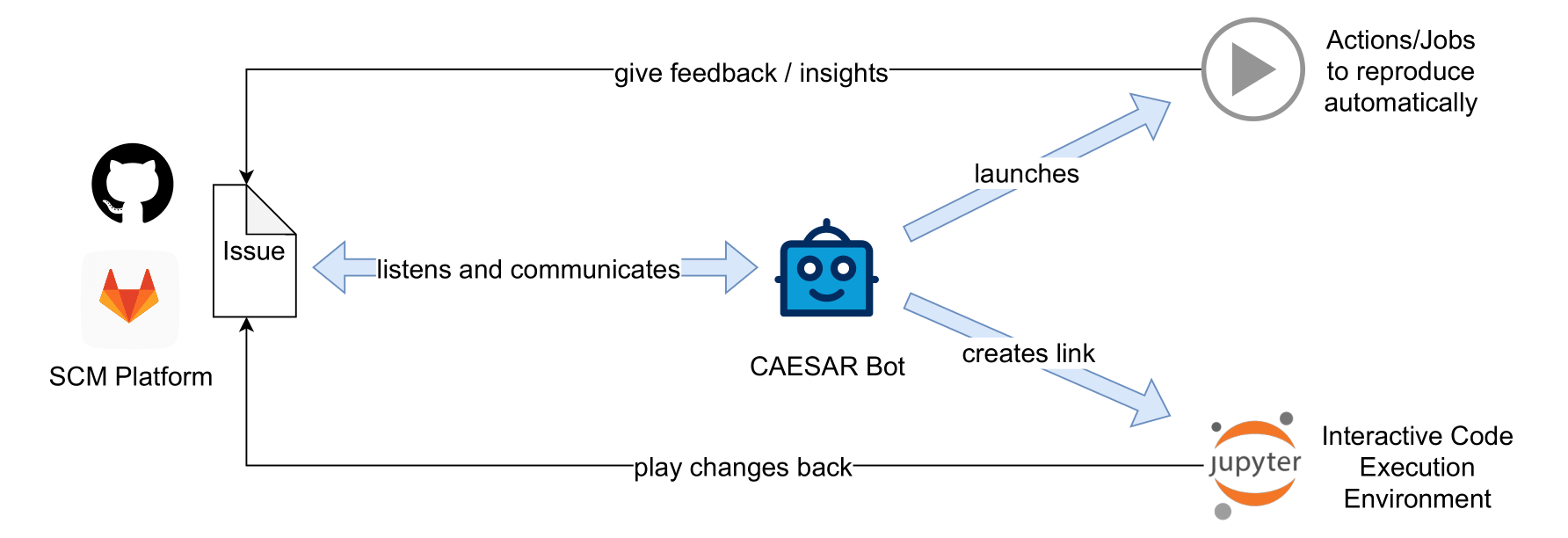
  • User creates an issue in an SCM platform
  • A CAESAR bot handles orchestration of tasks and communication in the issue
  • Actions/Jobs try to reproduce the issue in different environments in the background
  • An interactive code execution environment is provided
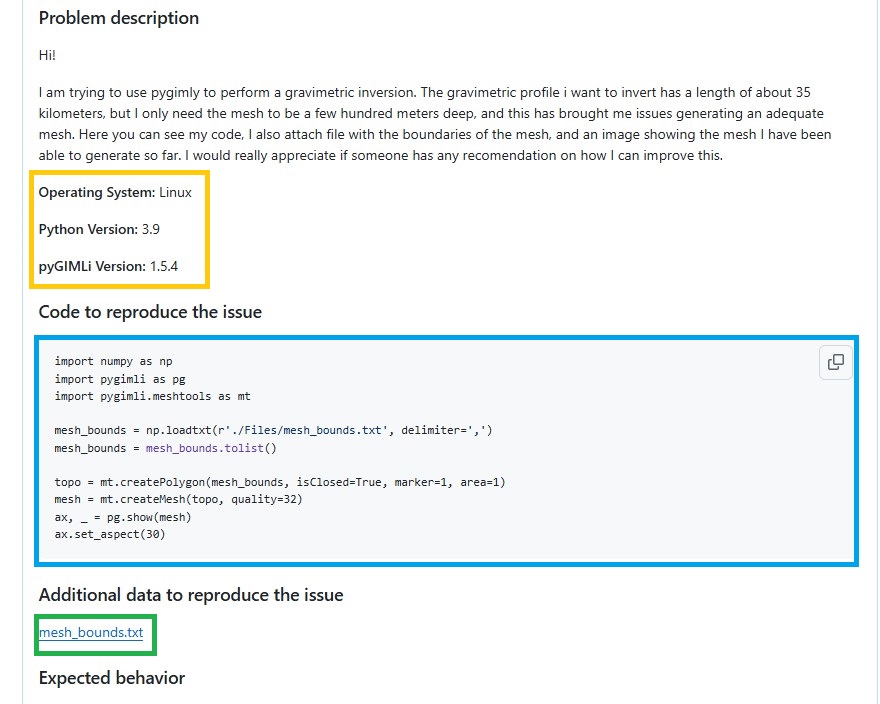
Prerequisite: Executable Issues

  • Minimal working example as code block or attached
  • Additional data
  • Environment details

Envisioned issue2docker Tool

  • Content provided by the issue “repository”:
    • Issue Text
      • Convert to ipynb using tools like Pandoc
      • Download files attached to the issue
      • Extract different parts (code, expected and actual output, environment,…)
    • Issue REES of the project
    • Maybe more (for example, issue comments)

General Development Principles

  • Provide necessary technical components free and open-source
    • but also consider the whole support workflow
  • Design for integration with existing and established platforms
    • but ensure digital sovereignty by establishing a generic tool chain
  • Develop the first prototype for and with pyGIMLi
    • but include the wider research software community early on

Live Demo of an Early Prototype

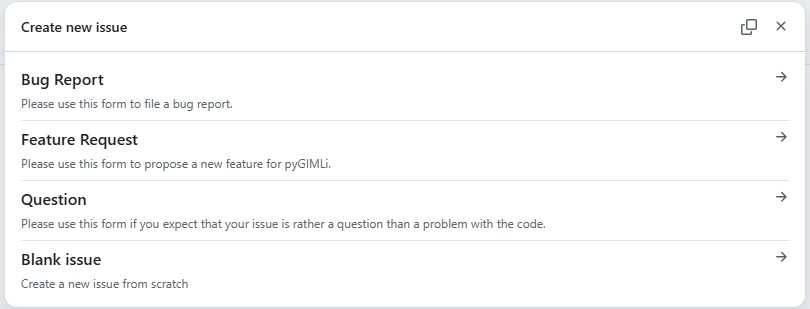
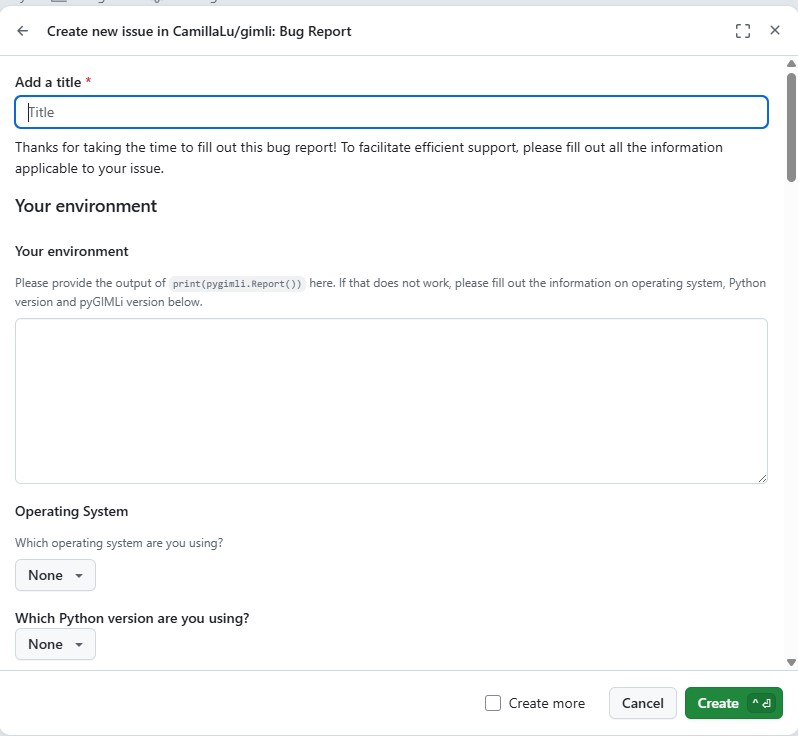
Issue Forms

Bot Communication on Issue Creation
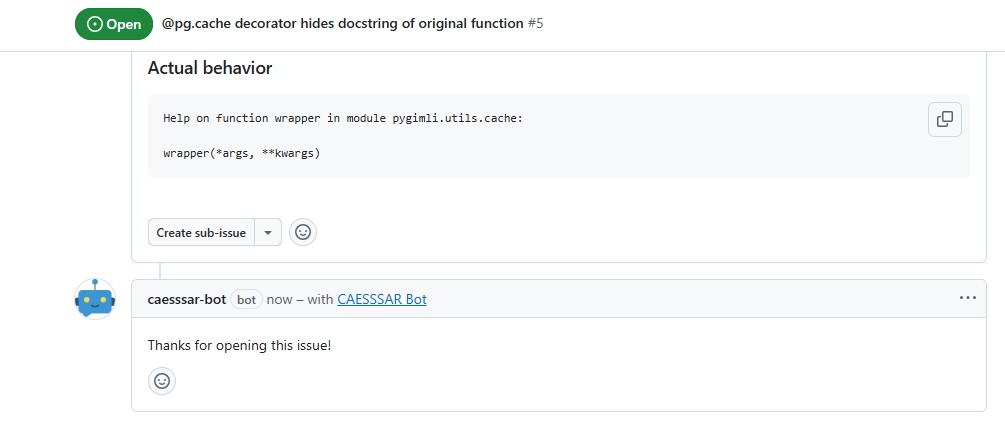
  • CAESAR bot listens on issue creation
  • More interaction is possible, e.g., explaining the process, asking for missing details, assigning labels,…

Reproduce Workflow in the Background

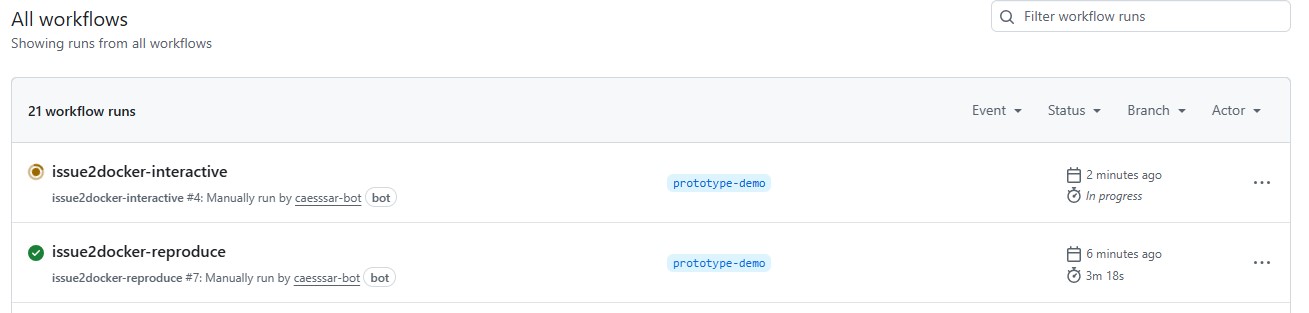
  • A workflow is started automatically in the background
  • Using the issue2docker tool, it tries to reproduce the described issue
  • For the environment, a file is given in the repository in .issue-environment/requirements.txt

Reproduce Workflow Results

  • Issue could not be reproduced, meaning the described Actual behavior is not happening when executing the provided code
  • In the example, it is because the prototype only uses the newest pyGIMLi version and there the bug is fixed

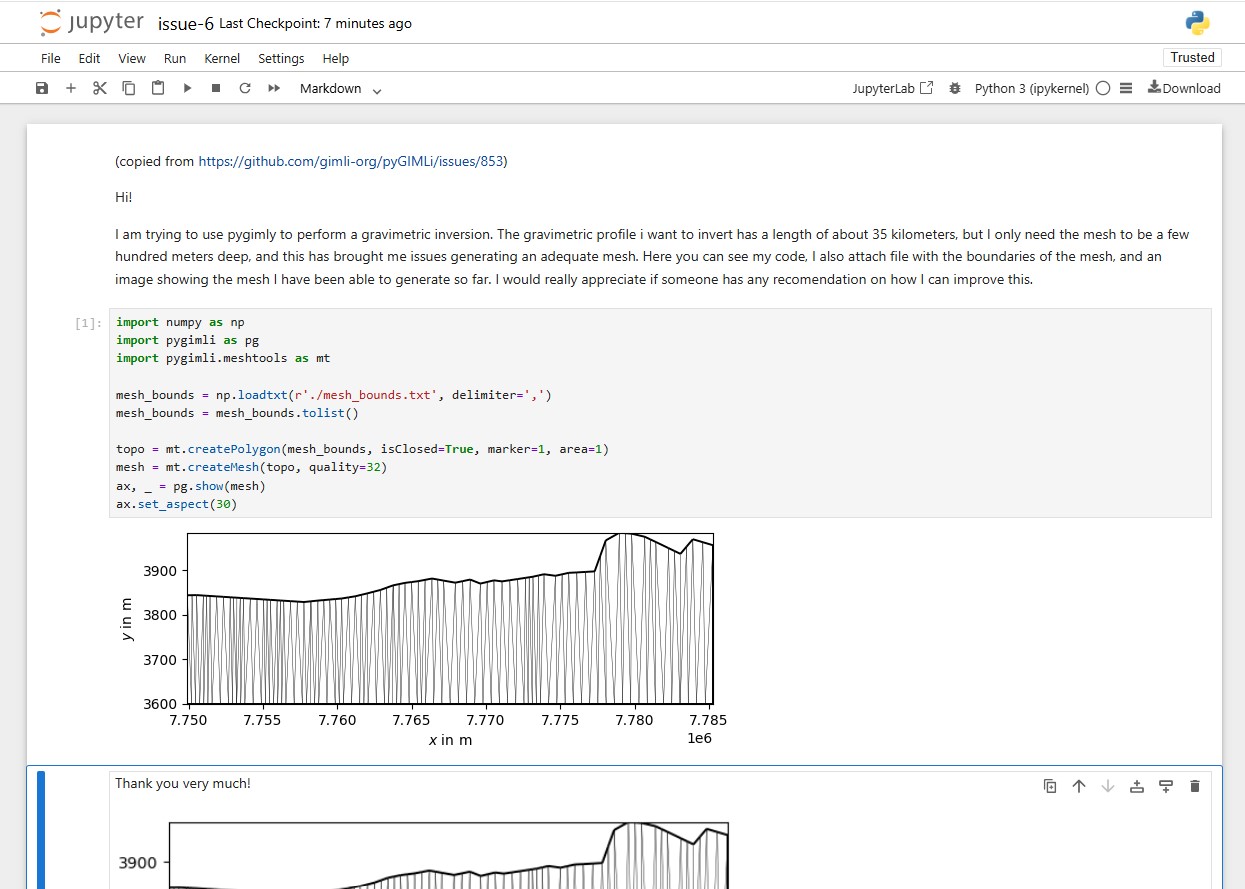
Workflow for Interactive Environment
Interactive Environment
Discussions on Requirements Part 1

Discussion Topics

  1. What does good software support look like for you as a user?
    • Past experiences: what helped, what didn’t?
    • Communication preferences and barriers
  2. What is important for the specification of an issue environment?
    • Which environment details are most valuable for testing?
    • Challenges in providing specifications (setup complexity, data privacy, etc.)
  3. How can automated issue reproduction be used by maintainers?
    • Which issue types are suitable for automation?
    • Does this fit your current support workflow?
  4. What could collaborative and interactive support look like?
    • Essential features for interactive environments
    • Preferred functionality for playing back changes


Note

The points are just suggestions, you are welcome to also discuss other directions.

Whiteboard

Please make use of the virtual whiteboard and collect your ideas and discussion points. The whiteboard will be started by the moderator of this topic.

Important

In the first round, topic 1 is only for users who are not also developers.


15 Minute Break

15 Minute Break

Discussions on Requirements Part 2

Discussion Topics

  1. What does good software support look like for you as a user?
    • Past experiences: what helped, what didn’t?
    • Communication preferences and barriers
  2. What is important for the specification of an issue environment?
    • Which environment details are most valuable for testing?
    • Challenges in providing specifications (setup complexity, data privacy, etc.)
  3. How can automated issue reproduction be used by maintainers?
    • Which issue types are suitable for automation?
    • Does this fit your current support workflow?
  4. What could collaborative and interactive support look like?
    • Essential features for interactive environments
    • Preferred functionality for playing back changes


Note

The points are just suggestions, you are welcome to also discuss other directions.

Whiteboard

Please make use of the virtual whiteboard and collect your ideas and discussion points. The whiteboard will be started by the moderator of this topic.

Important

In the first round, topic 1 is only for users who are not also developers.


Feedback Round

Closing Remarks

References

Rücker, C., T. Günther, and F. M. Wagner. 2017. pyGIMLi: An Open-Source Library for Modelling and Inversion in Geophysics.” Computers and Geosciences 109: 106–23. https://doi.org/10.1016/j.cageo.2017.07.011.